Can you learn the card game from an app?
Pokemon TCG Pocket is free, it is on your phone, and it is how I learned to play. Here is what it teaches you, what it quietly does not, and why the code cards from your packs have nothing to do with it.
Checked against Pokemon's own pages on August 16, 2026.
What it is
Pokemon Trading Card Game Pocket is the official free Pokemon card game for phones. It is made by Creatures Inc., who made the physical card game, along with DeNA, and it came out on October 30, 2024. You open two free booster packs a day and you can battle.
I learned to play from it. Not from a rulebook and not across a table from somebody sighing at me. The app has solo battles against the computer, and in a solo battle you can switch on an auto option and let the app take your turns while you watch. Watch enough turns and the game starts to make sense.
Apple named it iPhone Game of the Year for 2025, and Google Play made it Best Game.
Apple newsroom, December 2025. Google Play blog, November 2025.
That works, which is why this page exists. It also comes with a catch big enough that Pokemon spells it out itself, and that is the next section.
What it teaches you, and what it does not
The rules of Pokemon TCG Pocket are different from the Pokemon Trading Card Game.
Pokemon's own Pokemon TCG Pocket Gameplay FAQ, last edited July 30, 2026, read August 16, 2026.Start with what carries over, because it is most of it. Basic, Stage 1 and Stage 2 Pokemon, and evolving one onto another. Attacks that cost Energy. Weakness. Retreat. Abilities. Trainer and Supporter cards. One Active Pokemon facing your opponent's with the rest on the Bench. Drawing a card at the start of your turn. Knock Outs. That is the shape of the card game, and it is why watching this thing play teaches you something real.
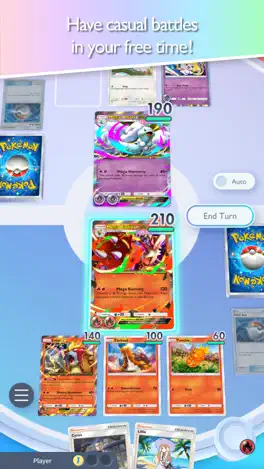
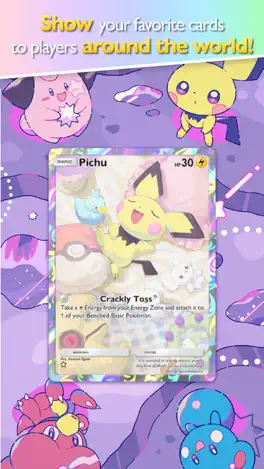
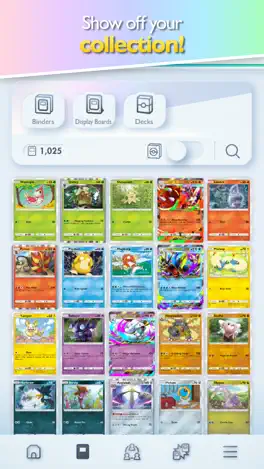
Then four things that do not carry over, each of which would trip you up at a table.
- The deck is 20 cards, not 60And at most two copies of a name, where the game your cards play allows up to 4 copies of a card, basic Energy excepted.
- There are no Energy cardsThis is the one that matters. An Energy Zone hands you one Energy a turn and you attach it wherever you like. Nothing in the deck, nothing to draw. Somebody who learned here builds a real deck with no Energy in it and then cannot attack.
- There are no Prize cardsYou score three points by knocking Pokemon out instead. There is no row of 6 cards counted off to the side, nothing to take, and none of the tension that gives a real game.
- The Bench is smallerSmaller than the 5 you get with physical cards.
The cards themselves are their own thing too. Pocket's expansions carry their own codes, many of its cards have never been printed on cardboard, and none of them are in our set guides.
So it teaches you the shape and not the numbers, and the numbers are what somebody corrects you on. When you want the real ones, the rules of the game you play with actual cards are the ones to have in your head at a table.
Your pack codes do not work here
The code card in a physical booster pack is not for this app. Pokemon's own description of what is in a booster pack says the code in it is redeemed in Pokemon TCG Live, and Pocket has no pack code redemption at all: it does not appear anywhere in the app's own documentation.
Pocket does have codes, which is where the confusion starts. They are gift codes from campaigns and events, they are entered on a separate web page using your in-game Support ID rather than inside the app, and they have nothing to do with anything you bought in a shop. We do not publish lists of them, because they expire in weeks and a page full of dead codes helps nobody.
This is not a small pile to be wrong about. 449 English booster packs have been counted on this channel, every one of them with a code card in it, and not one of those codes does anything here. If you are sitting on a stack of them, the other page explains what they are actually worth.
So which one should you install?
Live is the card game itself, digitally: the same rules, the same 60 card decks, and a use for the code cards out of your packs. Pocket is a smaller, faster game of its own on a phone, with free packs every day and nothing at all to do with those codes. The sharpest practical difference is the third row. Live wants a free Pokemon account before you play; Pocket never asks you for one. Both are official, both are free, and installing both costs nothing.
| Pokemon TCG Live | Pokemon TCG Pocket | |
|---|---|---|
| Where it runs | iPhone, iPad, Android, Windows and Mac | iPhone, iPad and Android. Phones and tablets only. |
| What it costs | Free, with optional in-app purchases | Free, with optional in-app purchases |
| Account needed | Yes. A free Pokemon account, now called Pokemon Trainer Central and older material calls it Pokemon Trainer Club. | No Pokemon account. You pick a region, confirm your age and play. Linking a Nintendo, Google or Apple account is optional and protects your save. |
| Deck size | 60 cards, the card game's own deck rules, checked for you | 20 cards, at most two copies of a name, and no Energy cards at all |
| Same rules as the cards on your table | Yes | No, and Pokemon says so outright |
| The code card in your pack | Yes. A booster pack code gives a digital pack from the same set. | Not used. The code in your pack is not for this app. |
| Trading | None. Pokemon says players cannot trade cards in Live. | With friends, once you are two weeks in, and both cards have to match on rarity |
| Playing the computer | Guided lessons in the Learning Lab, plus a mode for trying a deck out | Solo battles, step-up battles and solo events, and it can take your turns for you while you watch |
Neither one is better. They are two different games with the same artwork on the front.
Getting it
Two platforms and both are mobile: the App Store and Google Play. No Windows version, no Mac version and nothing in a browser, which is the row in that table most likely to catch you out. It is free with optional in-app purchases and it is about 766 MB to download, so check the phone has room.
 Pokémon TCG Pocket is the one to search for. The other app's icon is a different color.
You are not asked for a Pokemon account. You pick a country and region, confirm your age, accept the terms and you are in. Link a Nintendo, Google or Apple account on the first day anyway: Pokemon says that if you reinstall without linking, you will not be able to recover your save data yourself. Under a certain age only a Nintendo account can be linked, and Pokemon does not print the age because it differs by country.
As of July 2026 Pokemon asks for a phone from the last several years with 3GB of memory, running iOS 15 or Android 7 or later, and says even that is not a guarantee on every device. If your app store has it, you can play.
What is actually in it
- Two free packs a dayOn a twelve-hour timer. That is the whole pitch and it costs nothing: pack opening, every day, forever. For anybody who watches this channel it is the cheap version of the same feeling.
- Pack points, which is the good oneOpening packs from an expansion earns pack points for that expansion, and those points buy one specific card from it. They do not expire. If the card you want never turns up, you go and get it. Nothing in the physical hobby works like that, and it is the thing most worth knowing about the app.
- Wonder PickYou take one card from a set of face-down cards out of a pack somebody else opened. It runs on its own timer, and adding friends puts their openings into yours.
- Trading, which Live does not haveFriends only, unlocked two weeks after you start, and both cards have to match on rarity. The app carries the current list of what is eligible and shows what a trade costs before you confirm. The app called Trading Card Game Live does not trade. The casual one does.
- Solo and versusSolo battles, step-up battles that ladder up in difficulty, and limited-time solo events, all against the computer. Versus is against people and there is a ranked ladder running in seasons. Battles are not there the moment you install: they unlock at player level 3.
- The paid partsPoke gold is a currency you buy and it mostly buys speed, shortening the waits. The premium pass is a monthly subscription and the app shows what it costs. Neither is required and the free packs are the game.
There is a collecting half as well: a card dex, binders and display boards you arrange and can show other players, and cosmetic flair on cards. It runs its own ladder of rarity marks, and they are not the ones printed on your cards, which is what our rarity guide is about.
Tips for your first week
- Link an account on day one. Without one, a reinstall or a lost phone takes everything with it, and Pokemon says you will not be able to recover it yourself.
- Open both free packs every day, and claim your daily rewards before the day rolls over. Pokemon resets it at 6:00 a.m. UTC, which is 2:00 a.m. in Rochester, NY in summer and 1:00 a.m. in winter.
- Do not panic when there is no Battle button. Battles unlock at player level 3, and you get there by opening packs and playing with the collecting side first.
- Use a rental deck for your first matches. The app lends you complete decks, they work in solo battles, and each one has a limited number of uses, so spend them learning rather than hoarding them.
- Play the solo battles before you play people, and watch what the computer does with its turn. That is the whole trick, and it is how I learned.
- Buy the card you want with pack points rather than waiting for it to turn up.
- Add friends early. Trading and sharing both unlock two weeks in and both need them, and friends' pack openings feed your Wonder Pick.
That is the lot. It is free, it is two minutes a day, and it is how the guy who runs this channel learned to play. When you want the real thing, the rules are here and the shops around Rochester, NY will have somebody to play against.
The questions people ask before installing it
Can you learn the Pokemon card game from Pokemon TCG Pocket?
Partly. Evolution, Energy costs, Weakness, Retreat, Abilities, the Active spot and the Bench all work the way they do with real cards, and watching solo battles against the computer teaches you the shape of a game. The numbers are different, and Pokemon says outright that Pocket's rules are not the card game's rules.
How is Pokemon TCG Pocket different from the real card game?
A Pocket deck is 20 cards rather than 60, with at most two copies of a name. There are no Energy cards at all: an Energy Zone gives you one Energy a turn. There are no Prize cards, and you win by scoring three points instead. The Bench is smaller than the 5 you get with physical cards.
Can I use my booster pack code card in Pokemon TCG Pocket?
No. The code card in a physical booster pack is for Pokemon TCG Live. Pocket has no pack code redemption at all. Its own gift codes come from campaigns and are entered on a web page rather than in the app.
Is Pokemon TCG Pocket free?
Yes, with optional in-app purchases. You do not need a Pokemon account to play, and you open two free booster packs a day.
Which should I install, Pokemon TCG Live or Pokemon TCG Pocket?
Live is the card game itself with the same rules and a use for your pack codes. Pocket is a smaller, faster game of its own on a phone. Live needs a free Pokemon account and Pocket does not. Both are free and installing both costs nothing.
One link, on Pokemon's own site
The official site, which is where both store buttons live. It is a download page rather than a guide, so do not go there looking for the rules.
- Download Pokemon TCG Pocket
App Store and Google Play
The official page for the app, carrying both store links.
Everything about the app on this page comes from Pokemon's own material, read on August 16, 2026: the Pocket Gameplay, Battle Rules, Trading, Sharing, Purchase, Account Link, Gift Code and Technical support articles, Pokemon's own guides to building a deck and to collecting, the official Pokemon TCG Pocket site and both store listings. Every number about the physical card game is taken from the same rulebook quotes that our rules page prints, so the two pages cannot disagree. Two things are worth saying plainly. Pokemon publishes no Bench limit for Pocket, which is why this page says the Bench is smaller and gives no number. And Pokemon documents the solo battles, the rental decks and the level 3 unlock but not the option that plays your side for you, so that one sentence describes how the app behaves rather than repeating a Pokemon page. The app updates roughly monthly and several things named here were added after launch, so if you find something missing this page is behind rather than wrong. If the app disagrees with this page, the app is right. The app icon and the screenshots on this page are from Pokémon TCG Pocket's own App Store listing, published by The Pokemon Company, mirrored here at the size they are drawn.